
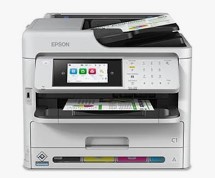
Epson M200 Resetter Tool: A Step-by-Step Guide to Clearing the “Service Required” Error
Epson M200 Resetter Tool Easy Download, Like all Epson printers, the Epson M200 has a built-in waste ink counter that tracks how much ink the printer’s internal pads have absorbed. When this counter fills up, the printer locks itself and shows a “Service Required” error to prevent ink from leaking out . You can fix this by using a resetter tool to clear the counter. Here’s how it works.
Understanding the Problem
The error is triggered by a software estimate, not a physical sensor, so it can sometimes activate even when the pads aren’t completely full . To get your printer running again, you need a tool like the Epson Adjustment Program, WIC Reset, or PadZero to reset the waste ink counter .
⚠️ Important: A software reset only clears the digital counter. The physical waste ink pads will still be saturated. If they are genuinely full, the printer could start leaking ink onto your desk. It’s highly recommended to replace the pads or install an external waste ink tank as a long-term solution .
Required Setup
Epson M200 Resetter Tool Easy Download, Before you begin, make sure you have the following ready:
- A Windows PC (most reset tools currently only support Windows)
- The Epson M200 connected via a USB cable (Wi-Fi or network resets are not supported)
- The official Epson printer driver installed (Windows’ generic driver is not sufficient for the tool to communicate with the printer)
Epson M200 Resetter Tool Easy Download
Step-by-Step Reset Guide
These steps are typical for most reset tools like the Epson Adjustment Program .
- Prepare Your Printer
- Run the Adjustment Program
- Reset the Waste Ink Counter
- Click the “Particular adjustment mode” button .
- From the list, select “Waste ink pad counter” and click “OK” .
- In the new window, click “Check”. This will read the current counter value, showing you how full it is .
- Select the checkbox next to the counter, then click the “Initialization” button to reset it .
- Wait for the program to finish. You may see a message prompting you to turn off the printer .
- Finalize
- Turn off the printer completely.
- Wait 30 seconds, then turn it back on.
Your Epson M200 should now be operational again with the error cleared.
Choosing a Resetter Tool
Troubleshooting Common Issues
If the reset tool doesn’t recognize your printer, try these steps: Epson M200 Resetter Tool Easy Download
- Disable VPN/Proxy: Turn off any active VPN or proxy connections that might interfere with the validation process .
- Close Printer Utilities: Close the Epson Status Monitor or any other printer software that might be using the USB port .
- Direct Connection: Plug the USB cable directly into a computer port, avoiding USB hubs .
- Run as Administrator: Right-click the reset tool and select “Run as administrator” .
- Restart Everything: Restart both your printer and your computer, then try again
Disclaimer: This guide is for educational purposes only. Using third-party reset tools may void your printer’s warranty. Always follow manufacturer guidelines and use at your own risk.
follow manufacturer guidelines and use at your own risk. Epson M200 Resetter Tool Easy Download
Disclaimer: This guide is for educational purposes only. Using third-party reset tools may void your printer’s warranty. Always follow manufacturer guidelines and use at your own risk.
মসজিদ এর ডিজিটাল ঘড়ি কিনতে এখানে ক্রিক করুন

অটোমেটিক ওয়াটার পাম্প কন্টোলার কিনতে এখানে ক্লিক করুন
আমারা দিচ্ছি নিজেদের কারখানায় উৎপাদিত, উৎকৃষ্ট মালামাল দ্বার তৈরি গ্যারান্টি সহ সকল ধরনের ডিজিটাল ঘড়ি, এল ই ডি টিভি বিলবোর্ড ডিসপ্লে, মেসেজ ডিসপ্লে।
Outdoor Digital Clock install Jessore Cantonment
Outdoor Digital Clock install Dhaka Cantonment
250 inch LED Tv Billboard install kumarpara, Rajshahi
Epson printer Red light problem Full VIdeo Link With All Error Solve : Link
আমাদের কাছে যে যে মডেলের রিসেট টোলস আছে
L100
L110 L210 L300 L350 L355
L130 L220 L310 L360 L365
Epson L380 L383 L385 L485 (ECC) + Keygen
L380
L800
L805
L1210-L1211-L1216-L1250-L1251-L1256-L3210-L3211-L3216-L3250-L3251-L3256-L5290-L5296
L1218 L1258 L1259 L3218 L3219 L3251 L3253 L3255 L3256 L3258 L3266 L3267 L3268 L3269 L5298
L1300
L1800
L3110
Epson L565 (ESP-EPIL)
L1210 L3210 L3250 L3251 L3260 L5290
Reset Epson L3118 L3119
Epson L3050 L3070 (ERO)
Epson L3160 (ECC)
Epson L3550 L3556 L5590 (ESP)
Reset_Epson_L3110
Epson L455 (ECC)
Epson L565 (ESP-EPIL)
Epson L655 (ESP)
Epson L11050 Adjustment Program
Epson L14150 L14158 Adjustment Program
Epson M105 M205 (EAI-LATIN)
Epson_L3100_L3101_L3110_L3150__EPIL____Keygen
L550-L555
Reset_Epson_L4260_L4261_L4267
Epson ET-4550
Reset_Epson_L5190
L6160-L6170-L6190
L6260_L6270_L6290
Reset EPSON L8050 (ESP)
Reset Epson L15150 L11160 WF-7830
RESET EPSON L15160_L15180
Reset Epson M1140 M1170 M1180 M2140 M2170 M3140 M3170 M3180
Epson M100 M101 M105 (ECC)
Epson M1140 1170 1180 2140 2170 3140 3170 3180
Reset_Epson_M1100_M1120(V10)
Epson PX730DW Adjustment Program
R270 by OrTHoTaMiNe
Reset Epson 1500W
Reset_Epson_WF3720
TX300F