
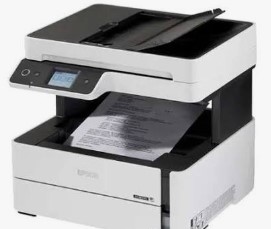
Epson M3170 Resetter Tools: A Complete Guide
Epson M3170 adjustment program Download, The Epson M3170 is a robust monochrome EcoTank printer designed for high-volume office use. Like all Epson printers, it tracks waste ink absorption through an internal counter. When this counter fills up, the printer locks and displays a “Service Required” error. Here is how to fix it.
Understanding the M3170’s Waste Ink System
The M3170 uses a maintenance box to collect waste ink from print head cleaning cycles . This box contains a T04D1 chip that tracks ink levels . When the chip reports that the box is full, the printer stops working to prevent ink leaks.
Key Insight: The M3170’s waste ink counter is stored on the maintenance box chip itself, not in the printer’s main firmware . This makes the reset process different from older Epson models. Epson M3170 adjustment program Download
Two Ways to Reset the M3170
Because the counter lives on the T04D1 chip, you have two clear options:
Option 1: Replace the T04D1 Chip (Simplest)
This is a physical solution requiring no computer or software. Epson M3170 adjustment program Download
- What you need: A replacement T04D1 chip, available from various suppliers
- How it works: Remove the old chip from the maintenance box and snap in the new one
- Result: The printer automatically reads the new chip and resets the counter to zero
Advantages: No software knowledge needed, works every time, and takes less than a minute .
Option 2: Software Reset Using WIC Reset Utility
If you prefer a software approach, the WIC Reset Utility explicitly supports the M3170 .
Supported Functions for M3170:
- Reset waste ink counters
- Read current counter values
- Clean printhead
- Run ink charging routine
- Read/write printer EEPROM settings
Important: Unlike the physical chip swap, the WIC Reset is a paid utility that requires purchasing a reset key.
⚠️ Critical Warning: The official Epson Adjustment Program may not support waste ink counter reset for the M3170 . Always verify compatibility before downloading any software. Epson M3170 adjustment program Download
Step-by-Step Guide: Software Reset Method
If you choose the software approach:
- Connect via USB cable (Wi-Fi not supported for resetting)
- Temporarily disable antivirus – it may block the tool
- Download and install the WIC Reset Utility
- Select the M3170 model from the list
- Click “Read” to check the current counter value
- Purchase a reset key through the program
- Enter the key and click “Reset” to clear the counter
- Restart the printer
Critical Reminder: Physical Maintenance Still Required
A software reset only clears the digital counter. The physical maintenance box may still be full of ink. Repeated resets without replacing the box risk ink leakage that can permanently damage your printer . Epson M3170 adjustment program Download
Best Practice: When the error appears, inspect the maintenance box. If it has been heavily used, replace the box or install a new T04D1 chip at the same time as resetting .
Quick Comparison
| Solution | What You Do | Best For |
|---|---|---|
| Replace T04D1 Chip | Physically swap the chip | Simple, no-software fix |
| WIC Reset Utility | Software reset via USB | Users comfortable with tech tools |
Have questions about resetting your Epson M3170? Share your experience below!
Disclaimer: This guide is for educational purposes only. Using third-party reset tools or chips may void your printer’s warranty. Always follow manufacturer guidelines and use at your own risk.
follow manufacturer guidelines and use at your own risk.
Epson M3170 adjustment program Download
মসজিদ এর ডিজিটাল ঘড়ি কিনতে এখানে ক্রিক করুন

অটোমেটিক ওয়াটার পাম্প কন্টোলার কিনতে এখানে ক্লিক করুন
আমারা দিচ্ছি নিজেদের কারখানায় উৎপাদিত, উৎকৃষ্ট মালামাল দ্বার তৈরি গ্যারান্টি সহ সকল ধরনের ডিজিটাল ঘড়ি, এল ই ডি টিভি বিলবোর্ড ডিসপ্লে, মেসেজ ডিসপ্লে।
Outdoor Digital Clock install Jessore Cantonment
Outdoor Digital Clock install Dhaka Cantonment
250 inch LED Tv Billboard install kumarpara, Rajshahi
Epson printer Red light problem Full VIdeo Link With All Error Solve : Link
আমাদের কাছে যে যে মডেলের রিসেট টোলস আছে
L100
L110 L210 L300 L350 L355
L130 L220 L310 L360 L365
Epson L380 L383 L385 L485 (ECC) + Keygen
L380
L800
L805
L1210-L1211-L1216-L1250-L1251-L1256-L3210-L3211-L3216-L3250-L3251-L3256-L5290-L5296
L1218 L1258 L1259 L3218 L3219 L3251 L3253 L3255 L3256 L3258 L3266 L3267 L3268 L3269 L5298
L1300
L1800
L3110
Epson L565 (ESP-EPIL)
L1210 L3210 L3250 L3251 L3260 L5290
Reset Epson L3118 L3119
Epson L3050 L3070 (ERO)
Epson L3160 (ECC)
Epson L3550 L3556 L5590 (ESP)
Reset_Epson_L3110
M200
M201
M205
Epson L455 (ECC)
Epson L565 (ESP-EPIL)
Epson L655 (ESP)
Epson L11050 Adjustment Program
Epson L14150 L14158 Adjustment Program
Epson M105 M205 (EAI-LATIN)
Epson_L3100_L3101_L3110_L3150__EPIL____Keygen
L550-L555
Reset_Epson_L4260_L4261_L4267
Epson ET-4550
Reset_Epson_L5190
L6160-L6170-L6190
L6260_L6270_L6290
Reset EPSON L8050 (ESP)
Reset Epson L15150 L11160 WF-7830
RESET EPSON L15160_L15180
Reset Epson M1140 M1170 M1180 M2140 M2170 M3140 M3170 M3180
Epson M100 M101 M105 (ECC)
Epson M1140 1170 1180 2140 2170 3140 3170 3180
Reset_Epson_M1100_M1120(V10)
Epson PX730DW Adjustment Program
R270 by OrTHoTaMiNe
Reset Epson 1500W
Reset_Epson_WF3720
TX300F