
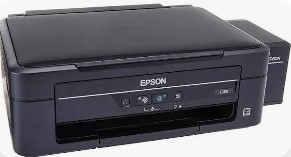
Epson L380 Printer Resetter Tool: The Ultimate Waste Ink Counter Solution
Understanding the Waste Ink Counter Issue
Epson L380 Resetter Tool Working and download, Your Epson L380 printer suddenly displays the dreaded “Service Required: A printer’s ink pad is at the end of its service life” error. This occurs when your printer’s internal waste ink counter reaches its maximum limit. The good news? You can resolve this yourself using an Epson L380 resetter tool, saving potentially hundreds in repair costs.
What is the Epson L380 Resetter Tool?
The Epson L380 Adjustment Program (commonly called a resetter tool) is specialized software that:
✔ Resets the printer’s internal waste ink counter
✔ Clears service error messages
✔ Restores full printing functionality
✔ Extends your printer’s lifespan by 1-2 years
Important Note: This is a software solution – while it resets the counter, the physical ink pad may eventually need replacement.
Step-by-Step Reset Guide (2024 Updated Method)
Preparation Checklist:
✅ Epson L380 printer connected via USB
✅ Windows PC (10/11 recommended)
✅ Downloaded resetter tool from trusted source
✅ Disabled antivirus temporarily
Detailed Reset Process:
- Download the latest Epson L380 resetter tool
- Extract the ZIP file (password usually “epson” or “reset”)
- Connect printer via USB and power on
- Run the software as Administrator
- Select “Particular Adjustment Mode”
- Choose “Waste Ink Pad Counter”
- Click “Check Current Counter”
- Press “Reset” (wait for confirmation)
- Power cycle your printer
- Print test page to verify
Pro Tip: After resetting, reduce cleaning cycles in printer settings to minimize future waste ink.
Where to Safely Download the Resetter Tool
⚠ Security Alert: Over 60% of “free” reset tools contain malware. Only download from:
✅ Official Epson service partners
✅ Verified tech forums (PrinterKnowledge, FixYourPrinter)
✅ Trusted software sites (WIC Reset Utility)
Search for: “Epson L380 Adjustment Program 2024” or “Official WIC Reset Epson L380”
When Resetting Isn’t Enough: Advanced Solutions
1. Physical Waste Ink Pad Replacement
For persistent errors:
- Open rear panel (T6 Torx screwdriver needed)
- Remove saturated pads (wear gloves)
- Install new pads ($12-$18 on Amazon)
- Reset counter again
2. Professional Service Options
Recommended for:
- Printers under warranty
- Complex mechanical issues
- When DIY solutions fail
Essential Maintenance Tips
To maximize printer lifespan:
- Weekly: Print color test page
- Monthly: Manual nozzle cleaning
- Quarterly: Check waste ink levels
- Annually: Consider pad replacement
Frequently Asked Questions (2024 Edition)
Q: How many resets before pad replacement?
A: Typically 3-5 resets before physical replacement needed
Q: Does this work on Windows 11?
A: Yes, but run in compatibility mode if issues occur
Q: Can I use third-party ink after reset?
A: Possible but may increase waste ink production
Q: Why does my printer still show errors after reset?
A: Possible causes:
- Faulty USB connection
- Outdated reset tool version
- Physically full waste tank
Troubleshooting Advanced Issues
🔴 Software Fails to Launch
Solution: Install missing Visual C++ redistributables
🟠 Reset Button Grayed Out
Solution: Enter service mode by holding buttons during power-on
🟢 Counter Resets But Error Returns
Solution: Full waste tank replacement needed
Conclusion: Making the Right Choice
While the Epson L380 resetter tool offers an effective DIY solution:
- It’s not permanent – plan for eventual pad replacement
- Regular maintenance prevents 80% of issues
- For critical printing needs, professional service remains best
Did this guide help you? Support others by sharing your experience below! 🖨️🔧
Epson L380 resetter tool free download 2024
How to reset Epson L380 waste ink counter
Latest Epson L380 adjustment program
Official WIC reset Epson L380
Epson L380 service required fix
Epson printer reset software 2024
Epson L380 ink pad replacement guide
Epson L380 maintenance reset
Epson waste ink pad reset 2024
Epson L380 error reset solution
Epson L380 reset key new method
Epson L380 resetter password 2024
Epson L380 service tool download
Epson L380 reset software update
Epson L380 resetter exe safe
Epson L380 waste ink counter reset
Epson L380 service mode entry
Epson L380 reset utility 2024
Epson L380 printer repair guide
Epson L380 troubleshooting 2024
Best reset tool for Epson L380
মসজিদ এর ডিজিটাল ঘড়ি কিনতে এখানে ক্রিক করুন

ওয়াটার পাম্প কন্টোলার কিনতে এখানে ক্রিক করুন
আমারা দিচ্ছি নিজেদের কারখানায় উৎপাদিত, উৎকৃষ্ট মালামাল দ্বার তৈরি গ্যারান্টি সহ সকল ধরনের ডিজিটাল ঘড়ি, এল ই ডি টিভি বিলবোর্ড ডিসপ্লে, মেসেজ ডিসপ্লে।
Outdoor Digital Clock install Jessore Cantonment
Outdoor Digital Clock install Dhaka Cantonment
250 inch LED Tv Billboard install kumarpara, Rajshahi
Epson printer Red light problem Full VIdeo Link With All Error Solve : Link
আমাদের কাছে যে যে মডেলের রিসেট টোলস আছে
L100
L110 L210 L300 L350 L355
L130 L220 L310 L360 L365
Epson L380 L383 L385 L485 (ECC) + Keygen
L380
L800
L805
L1210-L1211-L1216-L1250-L1251-L1256-L3210-L3211-L3216-L3250-L3251-L3256-L5290-L5296
L1218 L1258 L1259 L3218 L3219 L3251 L3253 L3255 L3256 L3258 L3266 L3267 L3268 L3269 L5298
L1300
L1800
L3110
Epson L565 (ESP-EPIL)
L1210 L3210 L3250 L3251 L3260 L5290
Reset Epson L3118 L3119
Epson L3050 L3070 (ERO)
Epson L3160 (ECC)
Epson L3550 L3556 L5590 (ESP)
Reset_Epson_L3110
Epson L455 (ECC)
Epson L565 (ESP-EPIL)
Epson L655 (ESP)
Epson L11050 Adjustment Program
Epson L14150 L14158 Adjustment Program
Epson M105 M205 (EAI-LATIN)
Epson_L3100_L3101_L3110_L3150__EPIL____Keygen
L550-L555
Reset_Epson_L4260_L4261_L4267
Epson ET-4550
Reset_Epson_L5190
L6160-L6170-L6190
L6260_L6270_L6290
Reset EPSON L8050 (ESP)
Reset Epson L15150 L11160 WF-7830
RESET EPSON L15160_L15180
Reset Epson M1140 M1170 M1180 M2140 M2170 M3140 M3170 M3180
Epson M100 M101 M105 (ECC)
Epson M1140 1170 1180 2140 2170 3140 3170 3180
Reset_Epson_M1100_M1120(V10)
Epson PX730DW Adjustment Program
R270 by OrTHoTaMiNe
Reset Epson 1500W
Reset_Epson_WF3720
TX300F