
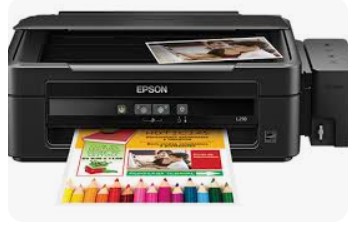
Epson L350 Resetter Tool: The Complete Guide to Waste Ink Counter Reset
Introduction
The Epson L350 is a versatile all-in-one EcoTank printer that has gained popularity for its efficient ink tank system and reliable performance. However, like all Epson printers, the L350 features a built-in waste ink counter that monitors ink absorption during cleaning and maintenance cycles. When this counter reaches its maximum limit, the printer displays a “Service Required” error and becomes unusable until the counter is properly reset.
This comprehensive guide explores the Epson L350 Resetter Tool, explaining how it works and providing detailed step-by-step instructions for successful waste ink counter resetting.
Understanding the Epson L350 Waste Ink System
The Purpose of Waste Ink Management
The Epson L350 employs an intelligent waste ink absorption system designed to:
- Collect excess ink during automatic print head cleaning cycles
- Capture residual ink from printer initialization and priming processes
- Prevent internal damage by containing surplus ink safely
- Maintain optimal print quality through systematic ink management
- Protect electronic components from potential ink damage
The Service Error Trigger Mechanism
The printer’s firmware continuously tracks ink absorption through a software counter. When this counter reaches its pre-programmed limit (typically 80-100%), the system automatically:
- Displays “Service Required” error message
- Deactivates all printing and scanning functions
- Activates warning lights and error indicators
- Locks the printer firmware until service is performed
Epson L350 Resetter Tool: Comprehensive Technical Overview
What is the Resetter Tool?
The Epson L350 Resetter Tool (official name: Epson Adjustment Program) is specialized software that:
- Establishes direct communication with printer firmware
- Accesses protected memory areas containing counter data
- Reads current waste ink counter values
- Resets counters to zero and clears error history
- Restores full printer functionality without hardware replacement
- Clears error flags from system memory
Technical Operation Process
- Secure Connection: Establishes encrypted USB link with printer
- Model Authentication: Verifies L350 compatibility
- Data Extraction: Reads current waste ink counter status
- Reset Execution: Clears counters and error codes
- Verification Phase: Confirms successful reset completion
Complete Step-by-Step Reset Procedure
Pre-Reset Preparation Essentials
- Windows computer (XP, 7, 8, 10, or 11 compatible)
- Quality USB cable for stable data transfer
- Genuine resetter software from trusted sources
- Stable power connection with surge protection
- A4 paper loaded in main input tray
Detailed Reset Operation
Step 1: Service Mode Activation
- Ensure printer is powered on and idle
- Load sufficient paper into all trays
- Press and hold the “Stop” button for 5-10 seconds
- Wait for distinctive light sequence indicating service mode
- Observe power light blinking pattern for confirmation
Step 2: Software Configuration
- Download authentic software from verified sources
- Connect printer to computer via USB cable
- Launch application with administrator privileges
- Select “L350 Series” from model selection menu
- Identify correct USB virtual port
Step 3: Reset Execution Protocol
- Navigate to “Particular Adjustment Mode”
- Choose “Waste Ink Pad Counter” option
- Click “Check” to read current counter percentage
- Analyze reading (typically 90-100% when intervention needed)
- Click “Reset” to clear counter
- Wait for success confirmation message
Step 4: System Finalization
- Properly exit software application
- Complete power cycle – turn printer completely off
- Wait 30-60 seconds for full system reset
- Restart printer using power button
- Execute comprehensive test print
Essential Safety Protocols & Maintenance Best Practices
Critical Safety Measures
- ✅ Use only verified software from authorized sources
- ✅ Create system restore point before proceeding
- ✅ Follow manufacturer guidelines precisely
- ❌ Avoid excessive reset frequency
- ❌ Never interrupt power during reset process
Physical Maintenance Requirements
- Regular inspection of waste ink absorption pads
- Professional external waste ink bottle installation recommended
- Scheduled internal cleaning every 6 months
- Timely replacement of saturated absorption pads
Preventive Optimization Strategies
- Optimize cleaning cycles based on actual need
- Maintain consistent printing schedule for nozzle health
- Use genuine Epson consumables for maximum compatibility
- Perform nozzle checks only when necessary
Advanced Troubleshooting Guide
Connection Resolution
- Validate USB cable functionality with other devices
- Confirm service mode activation sequence
- Ensure software version matches printer generation
- Test multiple USB host controllers
Reset Procedure Failures
- Verify exact printer model compatibility
- Check for firmware updates requiring newer reset software
- Confirm complete administrative privileges
- Validate Windows compatibility
Persistent Error Conditions
- Execute complete reset procedure repetition
- Physical inspection of waste ink containment system
- Professional diagnostic tool implementation
- Epson authorized service center consultation
Expert Frequently Asked Questions
Q: What is the expected reset interval for L350?
A: Approximately 12-24 months with standard usage, or after 8,000-12,000 pages printed.
Q: Does resetting impact printer reliability?
A: No, when performed correctly using authorized procedures and genuine software.
Q: How does resetting affect warranty status?
A: May void remaining manufacturer warranty. Verify coverage before proceeding.
Q: Can reset frequency be reduced?
A: Yes, through optimized usage patterns and regular physical maintenance.
Q: What indicates need for physical maintenance vs reset?
A: Rapid error recurrence after reset suggests physical pad replacement requirement.
Professional Maintenance Management
Monitoring & Analytics
- Implement print volume tracking
- Log maintenance cycle frequency and duration
- Record historical reset data and counter values
- Analyze ink consumption patterns for optimization
Long-term Preservation Strategies
- Develop comprehensive maintenance calendar
- Schedule firmware updates during planned downtime
- Establish preventative cleaning protocols
- Implement proper storage procedures for infrequent use
Performance Optimization
- Maintain consistent printing schedule for mechanical health
- Utilize appropriate media types for specific applications
- Configure optimal quality settings for each task type
- Plan maintenance activities during predictable low-usage periods
Cost-Benefit Analysis
Financial Advantages
- Eliminates expensive service center visits (saving $50-$100 per service)
- Extends printer lifespan by 2-3 years on average
- Reduces operational downtime significantly
- Minimizes total cost of ownership
Environmental Benefits
- Reduces electronic waste generation
- Extends product lifecycle
- Conserves manufacturing resources
- Supports sustainable printing practices
Conclusion
The Epson L350 Resetter Tool provides an essential technical solution for maintaining continuous printer operation and maximizing return on investment. By thoroughly understanding the waste ink management architecture and mastering the reset methodology, users can significantly extend printer service life while minimizing operational costs.
While software resetting effectively addresses the digital counter limitation, comprehensive physical maintenance remains paramount for long-term reliability. Implementing structured usage protocols and regular care regimens will substantially reduce reset frequency while ensuring consistent print quality.
Professional Recommendation: Maintain a detailed log tracking print volumes, cleaning cycles, and reset history to proactively manage your printer’s health and anticipate future maintenance needs accurately.
Need technical assistance with your Epson L350 reset process? Share your implementation challenges or success stories in the comments section below!
Critical Disclaimer: This technical guide is provided for educational purposes only. Utilizing third-party reset tools may void manufacturer warranty and service agreements. Always adhere to OEM guidelines and accept full responsibility for implementation risks. The author assumes no liability for damages resulting from reset tool utilization or procedural deviations.
মসজিদ এর ডিজিটাল ঘড়ি কিতে এখানে ক্রিক করুন

Epson printer Red light problem Full VIdeo Link With All Error Solve : Link
আমাদের কাছে যে যে মডেলের রিসেট টোলস আছে
L100
L110 L210 L300 L350 L355
L130 L220 L310 L360 L365
Epson L380 L383 L385 L485 (ECC) + Keygen
L380
L800
L805
L1210-L1211-L1216-L1250-L1251-L1256-L3210-L3211-L3216-L3250-L3251-L3256-L5290-L5296
L1218 L1258 L1259 L3218 L3219 L3251 L3253 L3255 L3256 L3258 L3266 L3267 L3268 L3269 L5298
L1300
L1800
L3110
Epson L565 (ESP-EPIL)
L1210 L3210 L3250 L3251 L3260 L5290
Reset Epson L3118 L3119
Epson L3050 L3070 (ERO)
Epson L3160 (ECC)
Epson L3550 L3556 L5590 (ESP)
Reset_Epson_L3110
Epson L455 (ECC)
Epson L565 (ESP-EPIL)
Epson L655 (ESP)
Epson L11050 Adjustment Program
Epson L14150 L14158 Adjustment Program
Epson M105 M205 (EAI-LATIN)
Epson_L3100_L3101_L3110_L3150__EPIL____Keygen
L550-L555
Reset_Epson_L4260_L4261_L4267
Epson ET-4550
Reset_Epson_L5190
L6160-L6170-L6190
L6260_L6270_L6290
Reset EPSON L8050 (ESP)
Reset Epson L15150 L11160 WF-7830
RESET EPSON L15160_L15180
Reset Epson M1140 M1170 M1180 M2140 M2170 M3140 M3170 M3180
Epson M100 M101 M105 (ECC)
Epson M1140 1170 1180 2140 2170 3140 3170 3180
Reset_Epson_M1100_M1120(V10)
Epson PX730DW Adjustment Program
R270 by OrTHoTaMiNe
Reset Epson 1500W
Reset_Epson_WF3720
TX300F