
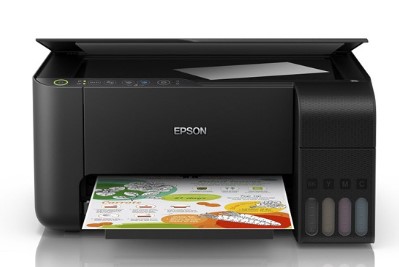
Epson L3250 Resetter Tool: The Ultimate Guide to Waste Ink Counter Reset
Introduction
The Epson L3250 EcoTank printer has revolutionized home and small office printing with its efficient ink tank system that significantly reduces printing costs. However, like all Epson printers, it contains a built-in waste ink counter that can eventually halt your printing operations. When this counter reaches its maximum limit, you’ll face the frustrating “Service Required” error that prevents any further printing.
This comprehensive guide will explain everything you need to know about the Epson L3250 Resetter Tool – how it works, when to use it, and step-by-step instructions for successful resetting.
Understanding the Waste Ink Counter System
Why Epson Printers Need Waste Ink Management
Epson printers are designed with an internal waste ink absorption system that serves several critical functions:
- Collects excess ink during regular print head cleaning cycles
- Captures residual ink during initialization and maintenance procedures
- Prevents internal leakage that could damage printer components
- Maintains print quality by properly managing ink flow
The Inevitable “Service Required” Error
The printer continuously monitors ink absorption through a software counter. When this counter reaches approximately 80-100% capacity, the printer automatically:
- Displays “Service Required” error message
- Stops all printing operations
- Flashes warning lights
- Locks the printer firmware
How the Epson L3250 Resetter Tool Works
What Exactly is the Resetter Tool?
The Epson L3250 Resetter Tool (officially known as Epson Adjustment Program) is specialized software that:
- Communicates directly with printer firmware
- Reads current values of waste ink counters
- Resets counters to zero
- Clears error flags from printer memory
- Restores normal operation without hardware replacement
Technical Operation Breakdown
- Initialization: Establishes secure connection with printer
- Handshake Protocol: Verifies printer model and compatibility
- Data Reading: Accesses waste ink counter values
- Reset Execution: Clears counters and error codes
- Verification: Confirms successful reset operation
Step-by-Step Reset Procedure
Preparation Requirements
- Windows computer (most reset tools are Windows-compatible)
- USB cable for printer connection
- Genuine resetter software (download from trusted sources)
- Stable power supply to prevent interruptions
Detailed Reset Process
Step 1: Enter Service Mode
- Ensure the printer is turned on
- Fully load paper in the input tray
- Press and hold the “Cancel” button for 5-10 seconds
- Wait for the printer to initialize in service mode
- Indicator lights will show specific patterns confirming service mode
Step 2: Software Setup
- Download and install the Epson L3250 resetter tool
- Connect printer to computer via USB cable
- Run the software as administrator
- Select “L3250 Series” from model list
- Choose appropriate USB port
Step 3: Counter Reset Operation
- Click “Particular Adjustment Mode”
- Select “Waste Ink Pad Counter” option
- Click “Check” to read current counter value
- Review the percentage (typically 90-100% when needing reset)
- Click “Reset” to clear the counter
- Wait for confirmation message
Step 4: Completion
- Close the software properly
- Turn off printer completely
- Wait 30 seconds
- Restart printer normally
- Perform test print to verify operation
Important Considerations & Best Practices
Safety Precautions
- ✅ Use genuine software from reliable sources
- ✅ Backup important data before proceeding
- ✅ Follow instructions precisely
- ❌ Avoid frequent unnecessary resets
- ❌ Don’t interrupt process once started
Physical Maintenance Recommendations
- Regular inspection of waste ink pads
- Consider external waste ink tank installation
- Clean printer interior periodically
- Replace saturated pads when necessary
Preventive Measures
- Minimize cleaning cycles – only when necessary
- Use printer regularly to prevent clogging
- Perform nozzle checks judiciously
- Use genuine Epson inks for optimal performance
Troubleshooting Common Issues
Reset Tool Not Connecting
- Check USB cable connection
- Verify printer is in service mode
- Ensure correct software version
- Try different USB port
Reset Not Working
- Confirm printer model compatibility
- Check for software updates
- Ensure complete reset process
- Verify printer firmware version
Error Persists After Reset
- Repeat the reset process
- Check physical waste ink pads
- Consult professional service
- Contact Epson support
Frequently Asked Questions
Q: How often will I need to reset my L3250?
A: Typically every 12-18 months with regular use, or after 10,000-15,000 pages printed.
Q: Is resetting safe for my printer?
A: Yes, when performed correctly with genuine software and proper procedures.
Q: Will resetting void my warranty?
A: It may void remaining warranty. Check your warranty status before proceeding.
Q: Can I prevent reaching waste ink limit?
A: Regular maintenance and minimizing unnecessary cleaning cycles can extend time between resets.
Q: What if I don’t reset the counter?
A: The printer will remain unusable until the counter is reset or serviced by Epson.
Conclusion
The Epson L3250 Resetter Tool is an essential utility that empowers users to maintain their printers efficiently and cost-effectively. By understanding how the waste ink system works and mastering the reset process, you can extend your printer’s lifespan and avoid unnecessary service costs.
Remember that while software resetting addresses the counter limitation, physical maintenance of your printer’s waste ink system remains crucial for long-term reliability. Regular care and proper usage habits will minimize the frequency of required resets.
Pro Tip: Keep a log of reset dates and printed page counts to anticipate when the next reset might be needed, ensuring uninterrupted printing operations.
Have questions about using the Epson L3250 Resetter Tool? Share your experiences or seek advice in the comments below!
Disclaimer: This guide is for educational purposes only. Using third-party reset tools may void your printer’s warranty. Always follow manufacturer guidelines and use at your own risk. The author is not responsible for any damage caused by improper use of reset tools.

ওয়াটার পাম্প কন্টোলার কিনতে এখানে ক্রিক করুন
Outdoor Digital Clock install Jessore Cantonment
Outdoor Digital Clock install Dhaka Cantonment
250 inch LED Tv Billboard install kumarpara, Rajshahi
Epson printer Red light problem Full VIdeo Link With All Error Solve : Link
আমাদের কাছে যে যে মডেলের রিসেট টোলস আছে
L100
L110 L210 L300 L350 L355
L130 L220 L310 L360 L365
Epson L380 L383 L385 L485 (ECC) + Keygen
L380
L800
L805
L1210-L1211-L1216-L1250-L1251-L1256-L3210-L3211-L3216-L3250-L3251-L3256-L5290-L5296
L1218 L1258 L1259 L3218 L3219 L3251 L3253 L3255 L3256 L3258 L3266 L3267 L3268 L3269 L5298
L1300
L1800
L3110
Epson L565 (ESP-EPIL)
L1210 L3210 L3250 L3251 L3260 L5290
Reset Epson L3118 L3119
Epson L3050 L3070 (ERO)
Epson L3160 (ECC)
Epson L3550 L3556 L5590 (ESP)
Reset_Epson_L3110
Epson L455 (ECC)
Epson L565 (ESP-EPIL)
Epson L655 (ESP)
Epson L11050 Adjustment Program
Epson L14150 L14158 Adjustment Program
Epson M105 M205 (EAI-LATIN)
Epson_L3100_L3101_L3110_L3150__EPIL____Keygen
L550-L555
Reset_Epson_L4260_L4261_L4267
Epson ET-4550
Reset_Epson_L5190
L6160-L6170-L6190
L6260_L6270_L6290
Reset EPSON L8050 (ESP)
Reset Epson L15150 L11160 WF-7830
RESET EPSON L15160_L15180
Reset Epson M1140 M1170 M1180 M2140 M2170 M3140 M3170 M3180
Epson M100 M101 M105 (ECC)
Epson M1140 1170 1180 2140 2170 3140 3170 3180
Reset_Epson_M1100_M1120(V10)
Epson PX730DW Adjustment Program
R270 by OrTHoTaMiNe
Reset Epson 1500W
Reset_Epson_WF3720
TX300F
100% OK FILE. I USE THIS FILE
Thanks