
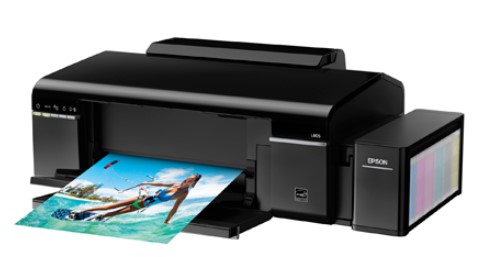
Epson L805 Resetter Tool: A Complete Guide to Resetting Waste Ink Counter
Introduction
The Epson L805 is a popular inkjet printer known for its high-quality photo printing and refillable ink system. However, like many Epson printers, it has a built-in waste ink counter that tracks the amount of ink absorbed by the printer’s internal pads. Once this counter reaches its limit, the printer stops working and displays an error like “Printer’s ink pads are at the end of their service life” or “Service Required.”
To fix this issue, you need the Epson L805 Resetter Tool (also called Waste Ink Pad Reset Tool or Adjustment Program). This blog explains how the resetter tool works and provides a step-by-step guide to resetting your Epson L805 printer.
Why Do You Need the Epson L805 Resetter Tool?
Epson printers have a waste ink counter that estimates how much ink has been absorbed by the waste ink pads (used during cleaning cycles and printing). When this counter reaches its limit, the printer locks itself to prevent ink leakage.
To continue printing, you must:
- Reset the waste ink counter using the Epson L805 Resetter Tool.
- Clean or replace the waste ink pads (optional but recommended for long-term maintenance).
Without resetting, the printer remains unusable, even if the pads are not full.
How Does the Epson L805 Resetter Tool Work?
The Epson L805 Resetter Tool is a software program that communicates with the printer’s firmware to reset the waste ink counter. Here’s how it works:
1. Downloading the Resetter Tool
- The official tool is called “Epson Adjustment Program” (usually named “WIC Reset” or “Resetter for L805”).
- Download it from a trusted source (avoid fake/malware-infected versions).
2. Preparing the Printer
- Ensure the printer is connected to a Windows PC via USB.
- Turn on the printer and check for any paper jams or errors.
3. Entering Service Mode
To reset the counter, the printer must be in Service Mode:
- Turn off the printer.
- Press and hold the “Stop” (or “Maintenance”) button.
- While holding the button, turn on the printer.
- Wait until the printer initializes in Service Mode (LED lights may blink differently).
4. Running the Resetter Tool
- Open the Epson L805 Resetter Tool on your PC.
- Select the correct printer model (L805) and port (USB).
- Click “Particular Adjustment Mode” > “Waste Ink Pad Counter.”
- Click “Read” to check the current counter value.
- If the counter is full, click “Reset” to clear it.
- Click “OK” and close the program.
- Restart the printer normally.
5. Optional: Cleaning/Replacing Waste Ink Pads
- If the printer leaks ink or shows frequent errors, open the printer and clean/replace the waste ink pads.
- Some users install an external waste ink tank to avoid future issues.
Important Tips & Warnings
✔ Use Genuine Software – Fake reset tools can damage your printer.
✔ Backup Data – Ensure no important print jobs are running before resetting.
✔ Reset Only When Needed – Frequent resets without pad maintenance can cause leaks.
❌ Void Warranty – Using unofficial tools may cancel your warranty.
Conclusion
The Epson L805 Resetter Tool is essential for extending your printer’s lifespan. By resetting the waste ink counter, you can avoid costly service repairs and keep printing smoothly. However, always maintain the waste ink pads to prevent leaks and damage.
Have you used the Epson L805 Resetter before? Share your experience in the comments!
Disclaimer: This guide is for educational purposes only. Unauthorized firmware modifications may void your warranty. Use at your own risk.
মসজিদ এর ডিজিটাল ঘড়ি কিনতে এখানে ক্রিক করুন

Epson printer Red light problem Full VIdeo Link With All Error Solve : Link
আমাদের কাছে যে যে মডেলের রিসেট টোলস আছে
L100
L110 L210 L300 L350 L355
L130 L220 L310 L360 L365
Epson L380 L383 L385 L485 (ECC) + Keygen
L380
L800
L805
L1210-L1211-L1216-L1250-L1251-L1256-L3210-L3211-L3216-L3250-L3251-L3256-L5290-L5296
L1218 L1258 L1259 L3218 L3219 L3251 L3253 L3255 L3256 L3258 L3266 L3267 L3268 L3269 L5298
L1300
L1800
L3110
Epson L565 (ESP-EPIL)
L1210 L3210 L3250 L3251 L3260 L5290
Reset Epson L3118 L3119
Epson L3050 L3070 (ERO)
Epson L3160 (ECC)
Epson L3550 L3556 L5590 (ESP)
Reset_Epson_L3110
Epson L455 (ECC)
Epson L565 (ESP-EPIL)
Epson L655 (ESP)
Epson L11050 Adjustment Program
Epson L14150 L14158 Adjustment Program
Epson M105 M205 (EAI-LATIN)
Epson_L3100_L3101_L3110_L3150__EPIL____Keygen
L550-L555
Reset_Epson_L4260_L4261_L4267
Epson ET-4550
Reset_Epson_L5190
L6160-L6170-L6190
L6260_L6270_L6290
Reset EPSON L8050 (ESP)
Reset Epson L15150 L11160 WF-7830
RESET EPSON L15160_L15180
Reset Epson M1140 M1170 M1180 M2140 M2170 M3140 M3170 M3180
Epson M100 M101 M105 (ECC)
Epson M1140 1170 1180 2140 2170 3140 3170 3180
Reset_Epson_M1100_M1120(V10)
Epson PX730DW Adjustment Program
R270 by OrTHoTaMiNe
Reset Epson 1500W
Reset_Epson_WF3720
TX300F
THANKS FOR GOOD SERVICE