
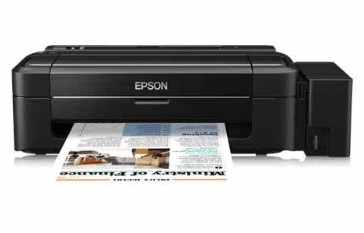
Epson L300 Printer Resetter Tool: Complete Waste Ink Counter Reset Guide
Introduction: Why You Need This Tool
Is your Epson L300 showing the dreaded “Service Required: A printer’s ink pad is at the end of its service life” error? This occurs when your printer’s waste ink counter reaches its limit. Our comprehensive guide will show you how to use an Epson L300 resetter tool to get your printer working again.
What is the Epson L300 Resetter Tool?
The Epson L300 resetter (officially called Adjustment Program or WIC Reset Utility) is specialized software that:
- Resets the printer’s internal waste ink counter
- Clears error messages
- Restores normal printing functionality
Key Features:
✔ Resets waste ink counter to zero
✔ Compatible with Windows OS
✔ Simple USB connection process
✔ Bypasses Epson’s service lock
Step-by-Step Reset Instructions
Before You Begin:
- Ensure printer is connected via USB
- Download the reset tool from a trusted source
- Disable antivirus temporarily (may flag the tool as false positive)
Reset Process:
- Download the Epson L300 resetter tool
- Extract the ZIP file (password is usually “reset” or “epson”)
- Run the software as Administrator
- Select “Particular Adjustment Mode”
- Choose “Waste Ink Pad Counter”
- Click “Check” to view current counter
- Press “Reset” to clear the counter
- Restart your printer
Pro Tip: After resetting, monitor your waste ink pad. If it’s saturated, consider replacing it to prevent leaks.
Where to Download Safely
⚠ Warning: Many fake reset tools contain malware. Only download from:
- Official Epson service providers
- Trusted tech forums (TECHPAPA, PrinterKnowledge)
- Reputable software sites (WIC Reset)
Search for: “Epson L300 Adjustment Program” or “WIC Reset Epson L300”
Alternative Solutions
- Physical Pad Replacement:
- Open printer casing
- Replace saturated waste ink pad
- Available on eBay/Amazon for $5-$10
- Professional Service:
- Recommended for printers under warranty
- Epson service centers can properly clean the system
Maintenance Tips to Prevent Future Issues
- Clean print heads manually to reduce waste ink
- Use genuine Epson ink cartridges
- Print regularly to prevent ink drying
- Monitor waste ink levels
Frequently Asked Questions
Q: Is resetting safe for my printer?
A: Yes, but it’s a temporary solution. Eventually replace the waste pad.
Q: Will this void my warranty?
A: Possibly. For warranty printers, visit Epson service centers.
Q: How often should I reset?
A: Only when the error appears. Frequent resets may indicate a full waste pad.
Conclusion
The Epson L300 resetter tool provides an effective way to bypass waste ink errors, but remember:
- It’s a temporary solution
- Physical pad replacement may be needed
- Regular maintenance prevents future issues
Did this guide help you? Share your experience in the comments below! 🖨️🔧
SEO Keywords:
Epson L300 resetter tool free download
How to reset Epson L300 waste ink counter
Epson L300 adjustment program
WIC reset Epson L300
Epson L300 service required fix
Epson printer reset software
Epson L300 ink pad replacement
Epson L300 maintenance reset
Epson waste ink pad reset
Epson L300 error reset
Epson L300 reset key
Epson L300 resetter password
Epson L300 service tool
Epson L300 reset software
Epson L300 resetter exe
১০০ ওয়াট সোলার এর সিষ্টেম এর দাম
মসজিদ এর ডিজিটাল ঘড়ি কিনতে এখানে ক্রিক করুন

Epson printer Red light problem Full VIdeo Link With All Error Solve : Link
আমাদের কাছে যে যে মডেলের রিসেট টোলস আছে
L100
L110 L210 L300 L350 L355
L130 L220 L310 L360 L365
Epson L380 L383 L385 L485 (ECC) + Keygen
L380
L800
L805
L1210-L1211-L1216-L1250-L1251-L1256-L3210-L3211-L3216-L3250-L3251-L3256-L5290-L5296
L1218 L1258 L1259 L3218 L3219 L3251 L3253 L3255 L3256 L3258 L3266 L3267 L3268 L3269 L5298
L1300
L1800
L3110
Epson L565 (ESP-EPIL)
L1210 L3210 L3250 L3251 L3260 L5290
Reset Epson L3118 L3119
Epson L3050 L3070 (ERO)
Epson L3160 (ECC)
Epson L3550 L3556 L5590 (ESP)
Reset_Epson_L3110
Epson L455 (ECC)
Epson L565 (ESP-EPIL)
Epson L655 (ESP)
Epson L11050 Adjustment Program
Epson L14150 L14158 Adjustment Program
Epson M105 M205 (EAI-LATIN)
Epson_L3100_L3101_L3110_L3150__EPIL____Keygen
L550-L555
Reset_Epson_L4260_L4261_L4267
Epson ET-4550
Reset_Epson_L5190
L6160-L6170-L6190
L6260_L6270_L6290
Reset EPSON L8050 (ESP)
Reset Epson L15150 L11160 WF-7830
RESET EPSON L15160_L15180
Reset Epson M1140 M1170 M1180 M2140 M2170 M3140 M3170 M3180
Epson M100 M101 M105 (ECC)
Epson M1140 1170 1180 2140 2170 3140 3170 3180
Reset_Epson_M1100_M1120(V10)
Epson PX730DW Adjustment Program
R270 by OrTHoTaMiNe
Reset Epson 1500W
Reset_Epson_WF3720
TX300F
Thanks for your servicea